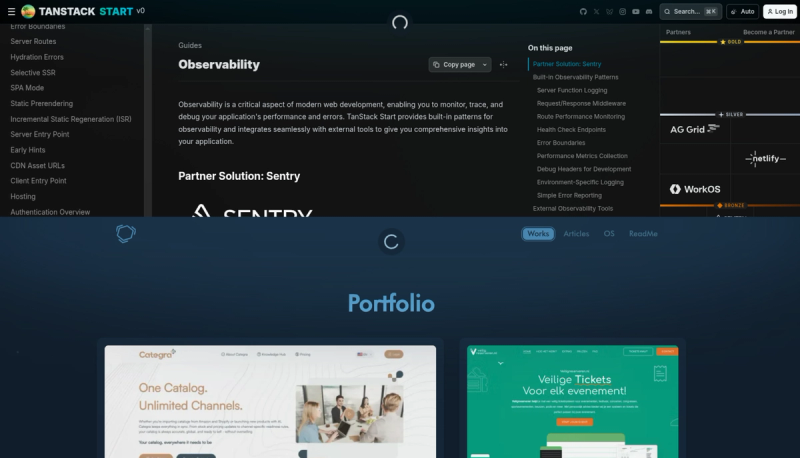

I noticed the top loader on tanstack.com — that subtle glowing indicator that slides in at the top during route transitions. It felt more polished than a full-screen spinner or a tiny inline loader. I wanted something similar for my own project.
The Design
A fixed-position loader at the top of the viewport. It should:
- Animate in and out smoothly
- Not block interaction with page content
- Work seamlessly with TanStack Router's navigation state
- Feel unobtrusive but clearly visible
The tanstack version combines a blurred glow background with a spinning icon. That's the direction I took.
The Component
import { cn } from "@sohanemon/utils";
import { Iconify } from "@sohanemon/utils/components";
import { motion } from "motion/react";
import type * as React from "react";

type TopLoaderProps = React.ComponentProps<typeof motion.div>;

export function TopLoader({ className, ...props }: TopLoaderProps) {
	return (
		<motion.div
			initial={{
				y: -80,
				opacity: 0,
				scale: 0.85,
			}}
			animate={{
				y: 18,
				opacity: 1,
				scale: 1,
			}}
			exit={{
				y: -80,
				opacity: 0,
				scale: 0.85,
			}}
			transition={{
				type: "spring",
				stiffness: 250,
				damping: 18,
			}}
			aria-hidden="true"
			className={cn(
				"pointer-events-none fixed top-0 left-0 z-99999999 h-96 w-full select-none",
				className,
			)}
			{...props}
		>
			<div className="absolute top-0 grid size-full -translate-y-1/2 place-content-center rounded-[50%] bg-border/50 blur-[70px]" />
			<Iconify
				className="mx-auto mt-2 size-14 animate-spin rounded-full bg-background/50 p-2.5"
				icon="lucide:loader-2"
			/>
		</motion.div>
	);
}
The container uses fixed positioning with a high z-index to stay above everything. The animation uses three states: initial for the starting position above the viewport, animate for the visible state, and exit for when navigation completes. The spring transition (stiffness 250, damping 18) gives it a natural bounce without feeling stiff.
The glow effect comes from a div with blur-[70px], a rounded shape, and reduced opacity sitting behind the spinner. I added pointer-events-none so clicks pass through to elements below, and aria-hidden="true" since it's purely decorative.
Integration with TanStack Router
TanStack Router exposes navigation state through useRouterState hook. You can use this to trigger the loader during route transitions.
// components/AppLoader.tsx
import { useNavigation } from "@tanstack/react-router";
import { AnimatePresence } from "framer-motion";
import { TopLoader } from "@/components/animated/top-loader";

export function AppLoader() {
	const isLoading = useRouterState({
		select: (s) => s.status === "pending",
	});

	return (
		<AnimatePresence>
			{isLoading && <TopLoader />}
		</AnimatePresence>
	);
}
Then place this component at the root of your app layout.
TanStack Router's useRouterState returns state which can be "idle" or "pending". The loader shows whenever the router is actively navigating.
Alternative: Using TanStack Query
If you're using TanStack Query for data fetching rather than relying solely on route loaders, you can hook into the query client's loading state:
// components/QueryLoader.tsx
import { useIsFetching, useIsMutating } from "@tanstack/react-query";
import { AnimatePresence } from "framer-motion";
import { TopLoader } from "@/components/animated/top-loader";

export function QueryLoader() {
	const isFetching = useIsFetching();
	const isMutating = useIsMutating();

	const isLoading = isFetching > 0 || isMutating > 0;

	return (
		<AnimatePresence>
			{isLoading && <TopLoader />}
		</AnimatePresence>
	);
}
This shows the loader whenever any query is fetching or any mutation is running. Useful when you have multiple async operations happening across the app.
Fine-Tuning
The blur and opacity values took some trial and error. I landed on blur-[70px] with bg-border/50 as a balance between visibility and subtlety. You might want to adjust the y offset (currently 18) depending on your header height or if you have a fixed navbar.
The component is intentionally generic — it doesn't know about your router or query client. That keeps it reusable. Just pass in the boolean controlling its visibility from whichever state management approach you use.
It's a small detail, but it ties the experience together during navigation.