
In certain scenarios, the need to fetch data directly on the server side without involving client components might arise. While this approach may not be universally necessary and is not considered ideal in all cases, it can be a playful exploration for those interested in server actions within a Next.js environment.
Let's take a step-by-step look at a simple trick to achieve server-side data retrieval using Next.js.
Step 1: Create a Form Markup
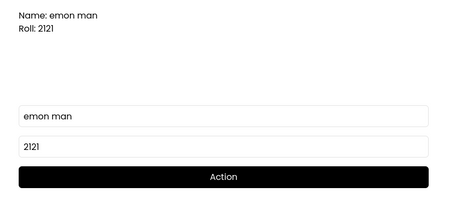
In the initial step, we set up a basic form with two input fields for 'name' and 'roll'.
<form
  action={handleAction}
  className={cn('flex flex-col gap-4 container-mini', className)}
  {...props}
>
  <input
    className="h-10 rounded-md border p-2"
    name="name"
    placeholder="name"
    type="text"
  />
  <input
    className="h-10 rounded-md border p-2"
    name="roll"
    placeholder="roll"
    type="text"
  />
  <button className="rounded-md bg-foreground px-4 py-2 text-background">
    Action
  </button>
</form>
Step 2: Implement a Server Action
The server action is responsible for handling the form data. Here, we use the 'use server' pragma to execute server-side logic. The data from the form is structured and then written to a JSON file.
async function handleAction(formData: FormData) {
  'use server';
  const data = {
    name: formData.get('name'),
    roll: Number(formData.get('roll')),
  };
  await writeFile('public/data.json', JSON.stringify(data));
}
Step 3: Retrieve and Display Data
Finally, we create a component to display the data fetched from the server. In this example, the 'DataShow' component renders the 'name' and 'roll' values obtained from the 'data.json' file.
import data from '@/public/data.json';

type DataShowProps = ComponentProps<'div'>;

export function DataShow({ className, ...props }: DataShowProps) {
  return (
    <div className={cn('my-32 container-mini', className)} {...props}>
      <p>Name: {data?.name}</p>
      <p>Roll: {data?.roll}</p>
    </div>
  );
}
This unconventional approach showcases the use of server actions in Next.js, enabling the direct manipulation of data on the server side. While this technique may not be suitable for every situation, it offers a unique perspective for those interested in experimenting with server-side functionalities in their Next.js applications. It's essential to consider the limitations and specific use cases where this method might prove valuable.